
A SaaS launch video script has five parts: hook, problem, product in action, proof and close. For 30 seconds you need about 65 to 85 spoken words, for 60 seconds 140 to 180, for 90 seconds 215 to 275. Across 43 English voiceovers from our own films, the median pace was 3.2 words per second (as of November 9, 2026). Write the script first, then an AI like Claude can build the animation to match every line.
Your SaaS launch video script decides whether people swipe away after three seconds or watch to the end. Before you think about colors, music or animation, you need words that fit the time. In this article you get three templates for 30, 60 and 90 seconds, a plan for what happens in which second, and a word budget. We did not copy that budget from other guides. We measured it on 43 voiceovers from our own films.
Why the script comes before the animation
Many people start with the picture. They build a nice dashboard scene, and then they notice that the line for it takes twelve seconds while the scene lasts four. After that, everything gets cut, stretched and patched. A finished script turns this around. Every line gets its seconds, and the animation follows the words.
This matters even more when an AI like Claude builds the video as code. Claude can place every scene on the exact second, but only if you say which second is for what. So a script with timings is the best start for any prompt. You can read how a prompt becomes a finished video in SaaS launch video with AI.
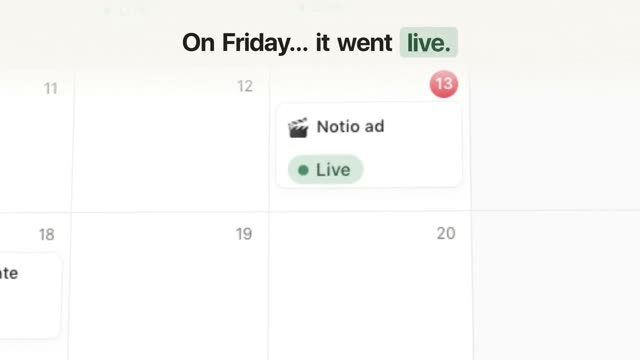
The video above is “Notio”, a film of just under 20 seconds in 16:9 from our library. It introduces an invented notes and database app. The film does not open with the name. It opens with a claim about the video itself: it started as one line in this app. Then that one line moves through a table, a board, a calendar and a gallery until it is “Live”. One idea, one path, no feature list. That is what a good launch script looks like on a small scale.
The five parts of a SaaS launch video script
Whether it runs 30 or 90 seconds, almost every good launch video has the same five parts. Only their length changes.
- Hook: one line that makes people curious. Best is the result, or a pain that everyone in your audience knows. No logo, no hello.
- Problem: how it works today and why that is annoying. Be concrete, with a number or a picture from daily work.
- Product in action: your real interface solving the problem. This part gets most of the time.
- Proof: something that shows it really works. A result in numbers, a before and after, or a real integration. Only what is true.
- Close: the name, one line about the benefit and one clear next step, like “Start your free trial”.
Many guides name a similar order, often as problem, promise, proof. The biggest difference between a weak and a strong script is the start. If the first seconds say “We are …”, people leave before the product even shows up.
How many words fit in 30, 60 and 90 seconds
Most guides count on about 130 to 160 words per minute. That works for calm explainer videos. Short launch and social videos are usually spoken faster. So we measured it. Across 43 English voiceovers from our own films, the pace was between 2.5 and 3.6 words per second. The median was 3.2, and the middle half was between 3.0 and 3.4. We measured from the first to the last spoken word, so the short pauses between lines are included.
This gives you a simple frame. Plan with 2.5 words per second if it should sound calm and clear, and with up to 3.2 if it should feel fast and dense. First take away the seconds where nobody speaks, mostly the logo at the end. The graphic shows how the five parts split across the three lengths:
- Hook 0 to 3 s
- Problem 3 to 8 s
- Product 8 to 20 s
- Proof 20 to 26 s
- Close 26 to 30 s
- Hook 0 to 4 s
- Problem 4 to 12 s
- Product 12 to 40 s
- Proof 40 to 52 s
- Close 52 to 60 s
- Hook 0 to 5 s
- Problem 5 to 18 s
- Product 18 to 62 s
- Proof 62 to 80 s
- Close 80 to 90 s
As of November 9, 2026. Pace measured on 43 English voiceovers from DrillUp films (word timings of the audio track, median 3.2 words per second). The split is a recommendation, not a fixed rule.
The safest check is simple. Read your script out loud with a stopwatch. If you have to rush, cut a line instead of speaking faster. If you write the script in another language, test it again, because word length changes a lot between languages.
The 30-second template to fill in
The short version matters most, because it fits most places. LinkedIn recommends 15 to 30 seconds for video ads, and Apple allows App Store preview videos of 15 to 30 seconds. Fill in the gaps in square brackets. Each step has one spoken line and a short picture idea:
Filled in, this template comes to about 50 to 70 words. That is on purpose below the budget of 65 to 85 words, so you have room for a second line where you need one. The free time belongs to the animation: a click, a number counting up, a transition. A video where every second is full of talking feels rushed and leaves no room for the picture.
Two rules make the template strong. First, each line says exactly one thing, and the picture shows that thing while it is said. Second, the proof has to be real. Do not write in customer numbers or quotes that do not exist. If you have no numbers yet, a real workflow in your interface is the best proof.
How 30 seconds becomes a 60 and a 90-second version
The longer versions are not new videos. They are the 30-second version with more room in the middle. Hook and close stay about the same length, because speed matters at the start and readability matters at the end.
60 seconds: The product part grows to about 28 seconds. Show three features in it, but as one story. Each feature is a step on the same path, just like the one line in the Notio film moves through four views. The problem gets a second line with a concrete picture. The proof can show two things, for example a number and an integration.
90 seconds: This length fits a homepage, a launch page or a Product Hunt listing. Now you have time for a small story: first the person with the problem, then the moment they open your product, then their day after. Even this length cannot hold more than four features. You can read what the Product Hunt gallery needs in Product Hunt launch video.
A practical way to work: write the 60-second version first. Cut it to 30 by removing two features and the second problem line. Stretch it to 90 by giving the product part a person and a workflow. For a single new feature after launch, even less is often enough, see feature announcement video.
From script to prompt for Claude
A finished script is already half of the prompt. Give Claude the lines with their seconds and write what happens on screen for each line. Add the format, colors, fonts and screenshots of your interface. A start can look like this:
16:9, 1920 × 1080, 30 frames per second, 30 seconds, launch video for my app. Follow this script with timings exactly: [paste script]. For each line, the text appears big on screen in the exact second it is spoken. Rebuild the interface from the attached screenshots. At the end, 4 seconds of logo and “Start your free trial” with no voice.
A short prompt like this gives you a first draft. For a film like Notio, Claude needs much more: spacing, font sizes, motion curves, how each scene flows into the next, and exactly when each word shows up on screen. That is what the long prompts in our library of AI video prompts contain. You pick a video whose structure fits your script, copy the prompt and swap in your content. You can also find ready frameworks for each video type in AI video prompt templates.
Five mistakes that make a launch script weak
- The name comes first: “We are [name] and …” is the most common start and the weakest one. Say the name when people want to hear it.
- Too many features: Ten features in 60 seconds make ten half scenes. Three features on one path stay in people’s heads.
- Insider words: Terms like “workspaces” or “pipelines” only make sense to people who already use your product. Describe what changes for the user.
- Talking every second: Without pauses, the picture has no time and the video feels hectic. Plan gaps for clicks and numbers.
- The close is only spoken: Many people see the end without sound. So the name and the next step must be on screen, not only in the voiceover.
One last test almost always helps. Give the script to someone who does not know your product. If they can say in one sentence what it does and who it is for, the script is done.
What this means for your launch
A good SaaS launch video does not start in an animation tool. It starts on an empty page with five lines: hook, problem, product, proof, close. Give each line its seconds, stay inside the word budget and read it out loud. After that, the animation is mostly execution, and with a fitting prompt Claude does most of that work. If you want to see what finished launch and product films made from prompts look like, browse our AI video prompts.
Frequently asked questions
How many words is a 60-second video script?
About 140 words for a calm read, and up to about 180 for a fast social video. Many guides use about 150 words per minute. In our own short films, the median pace was 3.2 words per second. Leave two to four seconds without speech at the end for your logo and call to action.
What is the best length for a SaaS launch video?
It depends on where it runs. LinkedIn recommends 15 to 30 seconds for video ads, and Apple allows App Store preview videos of 15 to 30 seconds (as of November 9, 2026). For a homepage or launch page, 60 to 90 seconds is common. Write the 60-second version first, then cut it down.
What should happen in the first three seconds?
Show the result or the problem, never the logo. Show what is different at the end, or name a pain your audience knows right away. People should hear your product name only after they want to know what it is.
Do I need a voiceover for a launch video?
No. Many videos start muted in the feed. Then the script works as short lines of text on screen, one line at a time. A voice makes the video feel more alive when someone turns the sound on. Every line should still make sense on screen without sound.
Can Claude turn my script into a video?
Yes, if you give it the script with seconds and a short picture note for each line. Claude then builds the animation as code, so text and interface stay sharp in every frame. You need a paid Claude plan, but no coding skills. For a polished result, the prompt needs much more detail than the script alone.