
A Product Hunt launch video is optional but common: according to Product Hunt, about 53 percent of products that reached Product of the Day since 2021 included one. It has to be a YouTube link, public or unlisted, not private. There is no official length. What works is a short video that shows the problem in the first seconds, then the product in its real interface, and ends on the name and the benefit.
On Product Hunt, people decide in seconds whether your product is worth a closer look. A Product Hunt launch video helps because it shows instead of tells: the problem you solve, what your product looks like and what gets better. This guide covers the official Product Hunt specs, an honest answer on length, a five-part structure taken from a real film in our library, and a prompt you can use to start your own video with Claude.
What your Product Hunt launch video has to do
Product Hunt is not the place for a long brand film. Visitors scroll past dozens of new products a day, skim taglines and only click when something makes sense right away. So your video has one job: answer “what is this and why should I care?” faster than your description can.
A video is optional, but most strong launches have one. In its launch preparation guide, Product Hunt says that about 53 percent of products that reached Product of the Day since 2021 included a video. That does not mean a video wins you votes on its own. It does tell you that successful makers rarely skip it.
Three things make a launch video work on Product Hunt:
- Problem first: The opening seconds show a pain your audience already knows. Not your logo, not your team.
- The real interface: This crowd wants to see the product. Show the app, the feature and the result, ideally with your actual content.
- Readable text: Plenty of people watch on mute. Short on-screen lines carry the story, and every word has to be sharp and spelled right.
Product Hunt video and gallery specs
Product Hunt does not host video. Your film goes into the gallery of your post as a YouTube link. Next to it you need a thumbnail and at least two images. Here is the layout:
As of October 23, 2026, per Product Hunt: Preparing for launch.
Two details cause trouble on launch day more than anything else. First, Product Hunt cannot embed a private YouTube video. Set it to public or unlisted and check the preview well ahead of time. Second, Product Hunt says shortened links will not load, so always paste the full YouTube URL. The Product Hunt day runs on Pacific time, and the guide suggests going live at 12:01 am so you get the full 24 hours. Upload your video the day before.
How long should it be?
Product Hunt does not set a length. Most launch guides land on 30 to 60 seconds, and very few recommend going past 90. Treat that as experience from many launches, not as a rule.
The opening matters more than the total. Someone who presses play gives you a few seconds. If it is clear by then what your product does, they keep watching. If not, they are back in the list. So plan your video from the front:
- First 5 seconds: the problem in one line and one image.
- Up to around 30 seconds: the product in action, one feature at a time.
- The ending: name, tagline, URL. Short and still, so people can read it.
A short 12 to 20 second film can be enough for Product Hunt if it covers that arc. It also works on X, LinkedIn and your landing page. A longer cut pays off when your product has several features people need to see before they get it.
A five-part structure, using Tokari as the example
The video above is “Tokari”, a 12-second product film for a made-up tool that keeps design tokens such as colors, spacing and type in one place. It is exactly the kind of product you see on Product Hunt every week. The film follows a structure you can reuse for almost any software launch:
- Trigger (about 0 to 2 seconds): A grid of color swatches, and one color changes. On screen: “Design changes one color”.
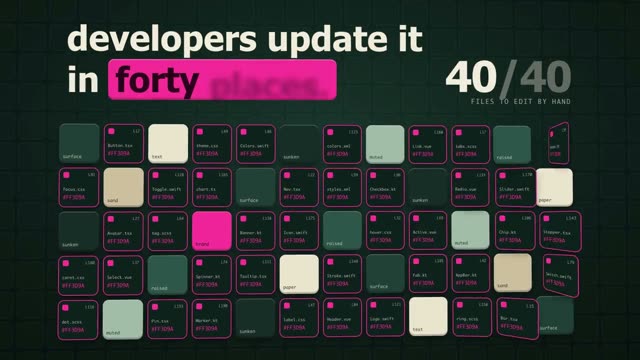
- Pain (about 2 to 4 seconds): A counter jumps from 13 to 40 while spots light up that someone has to fix by hand. The line finishes with “developers update it in forty places.”
- Product (about 4 to 6 seconds): A real interface appears, a list of every token in one file. “Tokari keeps every token in one source”.
- Outcome (about 6 to 9 seconds): Lines connect the source to a website and two phones. The change lands on web, iOS and Android.
- Brand (about 9 to 12 seconds): Logo, name and the tagline “One change, everywhere.” with a small line underneath that sums up the result.
Notice what is missing: no long intro, no logo sting before the story, no team photo. Every scene answers the question the viewer has at that moment. And since the film was built as code from a prompt with Claude, every word and number sits in every frame exactly as written. Why that is not a given with AI video is covered in why AI video garbles text.
Build your Product Hunt video from a prompt
You do not have to start from a blank page. The fastest route is a finished prompt whose video you like, adapted to your product. Here is the flow:
If you would rather write your own, give Claude a clear frame: format first, scenes with timings, and an instruction to keep your text exactly as written. Something like this gets you started:
16:9, 1920 × 1080, 30 fps, 40 seconds, for a Product Hunt gallery. Scene 1 (0 to 5 s): the problem in one large line. Scene 2 (5 to 25 s): three features of my app, each with the real interface from the attached screenshots. Scene 3 (25 to 35 s): the result as one number. Scene 4 (35 to 40 s): logo, tagline and URL. Use my text word for word, do not rephrase anything.
A prompt this short gives you a first draft. To reach something like Tokari, Claude needs a lot more: spacing, type sizes, easing curves and the timing of every word. That is what the long prompts in the DrillUp library contain. You will find more software examples under prompts for developer tools and in the 16:9 format. To save the finished animation as a video file, see how to export a Claude animation to MP4.
Common launch day mistakes
Most launch videos do not fail on the idea. They fail on small things. Check these five before you go live:
- The video is private: The gallery slot stays empty. Public or unlisted is enough.
- The link is shortened: Product Hunt says shortened links will not load. Copy the full address from YouTube.
- The opening drags: A five-second animated logo burns exactly the attention you need for the problem.
- The text is too small: The gallery player is not full screen. What reads fine in your editor is often too small once embedded.
- Asking for upvotes: Product Hunt recommends asking for feedback, not votes. End on an invitation to try the product instead.
One last test: watch your video once on mute and at a small size, the way a visitor sees it in the gallery. If you still understand what your product does, it is ready.
What this means for your launch
A good Product Hunt launch video does not have to be expensive or long. It needs a clear arc from problem to product to result, readable text and a clean ending with your name. Build it as an animation from code and you can still change it the night before launch without reshooting anything. For a broader guide to launch films for software and apps, read how to make a SaaS launch video with AI. And if you want to adapt a long prompt to your own product step by step, that is what the DrillUp Academy walks you through.
Frequently asked questions
Do I need a video for Product Hunt?
No. A square thumbnail and at least two gallery images are required. The video is optional. According to Product Hunt, though, about 53 percent of products that reached Product of the Day since 2021 had one (as of October 23, 2026).
Can I upload an MP4 file to Product Hunt?
No. Product Hunt only supports YouTube links for video. Upload your MP4 to YouTube, set it to public or unlisted and paste the full URL. Product Hunt says shortened links will not load.
How long should a Product Hunt launch video be?
Product Hunt does not set a length. Most guides suggest 30 to 60 seconds. What matters more is that the first seconds show the problem and the product appears early. A short 12 to 20 second film can be enough if it covers the whole arc.
Can I ask for upvotes in my launch video?
Product Hunt's own launch guide says to ask for feedback, not upvotes. In the video and in your first comment, invite people to try the product and share an honest opinion instead.
Can I make a Product Hunt video with AI?
Yes. The cleanest way is to let an AI like Claude build the animation as code. Then your product name, numbers and interface appear in every frame exactly as you wrote them. You need a paid Claude plan, but no coding skills.