
A feature announcement video shows one new feature, not your whole product. A four-part structure works well: the old problem, the feature in action, the result and your name. 10 to 20 seconds is often enough. For video ads, LinkedIn recommends 15 to 30 seconds (as of October 31, 2026). It looks cleanest when an AI like Claude builds the animation as code, because text and interface then stay exactly right.
You shipped a new feature, and now people need to notice it. A feature announcement video is the fastest way to get there. In a few seconds it shows what used to be painful and what now takes one click. You do not need a camera or an editing app to make one. This guide gives you a four-part structure based on a real film from our library, the right format for each channel and a prompt to start your own video with Claude.
How a feature video differs from a launch video
A launch video introduces a whole product. It explains who you are, which problem you solve and why people should trust you. A feature announcement video has a smaller but sharper job. It shows exactly one new feature, and it mostly talks to people who already know you: customers, trial users and visitors who checked you out before.
That leads to three rules that hold for almost every feature video:
- One feature per video: If you squeeze three updates into 15 seconds, none of them lands. If you have several, make several short videos.
- The benefit before the name: Nobody cares about the internal feature name. What matters is what is now easier, faster or cheaper.
- The real interface: Your users know your product. They want to see where the feature lives and what it looks like, not a generic stock graphic.
So a good feature video answers a single question: "What can I do now that I could not do before?" Anything that does not answer it gets cut.
The four-part structure, using Quieta as an example
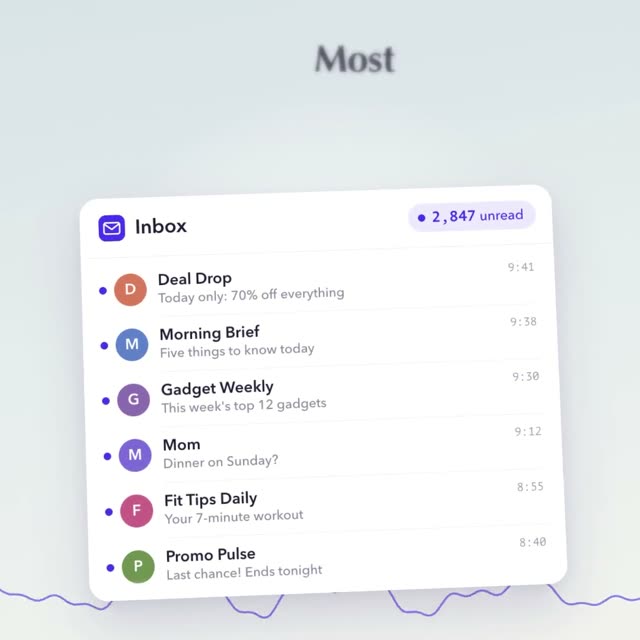
The video above shows "Quieta", a 14-second square film for a made-up app. It finds the newsletters you never open and unsubscribes you from all of them with one tap. The film does not list features. It shows that one moment, which makes it a good model for a feature announcement video:
The old problem (about 0 to 4 s)
An inbox where the counter climbs to 2,847 unread emails. One short line of large text sits above it. Everyone recognizes the feeling right away.
The feature at work (about 4 to 8 s)
The newsletters nobody ever opened get a label and lift out of the list. You see the feature doing its job, not just its name.
The result as a number (about 8 to 10 s)
One tap, the list flies away and the counter drops from 2,847 to 195. The difference is readable in a second.
Calm and the name (about 10 to 14 s)
A tidy inbox with three real emails, then the logo and the web address. The ending is calm, so people can read the name.
Times are rounded, measured on the film "Quieta" from the DrillUp library (14 seconds, 1080 × 1080).
Notice how little text the film needs. Each scene has half a sentence that matches exactly what is happening on screen, so it works on mute too. And because the film was built as code from a prompt with Claude, the number 2,847 is sharp and correct in every frame. Video models that generate images pixel by pixel cannot promise that. Our article on garbled text in AI video explains why.
How long should a feature announcement video be?
There is no fixed length. Most guides suggest somewhere between 15 and 60 seconds, depending on how much explaining the feature needs. For one clear, visible improvement, 10 to 20 seconds is often enough. The Quieta film shows that 14 seconds work when every second shows something.
LinkedIn gives one official number: for video ads it recommends 15 to 30 seconds, so a video qualifies for every placement. That advice is for ads, but it is a good frame for regular posts as well. Go longer only if people cannot understand the feature without several steps. In that case, a short feature video as the hook plus a detailed help article usually beats one long film.
Plan the length from the start. The first two to three seconds decide whether someone keeps watching, so show the problem there, not your logo. The ending with your name and a line like "Available now" can stay on screen for two or three seconds, so people have time to read it.
Where to post your feature video
A feature announcement video can work in several places at once. If it is built as an animation from code, a short instruction to Claude turns it into another format. The scenes stay the same, only the layout changes. These places are almost always worth it:
| Format | Length | |
|---|---|---|
| Changelog and website | 16:9 | 10 to 30 s, clear without sound |
| Customer email | 1:1 as a thumbnail with a link | same as the changelog |
| Inside the app | 1:1 or 16:9 | as short as possible, with a button to try it |
| LinkedIn adofficial spec | 4:5 recommended, also 1:1, 16:9, 9:16 | 15 to 30 s recommended |
| Reels, Shorts, Stories | 9:16 | 10 to 20 s |
As of October 31, 2026. LinkedIn according to LinkedIn Help: Video ads advertising specifications. All other rows are recommendations, not platform rules.
A note on email: many email apps do not play video inline. Use a still frame with a play button that links to the video in your changelog or on your website instead. The square format suits this well, because it looks the same on a phone and on a laptop. You can find more square examples among our 1:1 prompts.
How to build your feature video from a prompt
You do not have to start from zero. The fastest way is a ready-made prompt from the DrillUp library whose structure fits your feature. Paste it into Claude and swap the content: name, problem, number, colors and screenshots of your interface. Change the story, not just the logo. "Unread newsletters" might become "unpaid invoices" or "duplicate contacts" for you.
If you would rather describe it yourself, a clear frame helps. Give the format first, then the scenes with seconds, and finally a line saying the text must be used exactly as written. Here is a starting point:
1:1, 1080 × 1080, 30 frames per second, 15 seconds, feature announcement video for my app. Scene 1 (0 to 4 s): the old problem as a large number that climbs. Scene 2 (4 to 9 s): the new feature in the real interface from the attached screenshots. Scene 3 (9 to 12 s): the result as a number that drops. Scene 4 (12 to 15 s): logo and "Available now". Use the text exactly.
A prompt this short gives you a first draft. For a result like Quieta, Claude needs much more: spacing, font sizes, motion curves, the timing of every word and how one scene flows into the next. That is exactly what the long prompts in our library contain. To save the finished animation as a video file, read how to export a Claude animation to MP4.
Five mistakes that weaken a feature video
- Opening with the feature name: "New: Smart Cleanup 2.0" means nothing to strangers. Show the problem first and save the name for the end.
- Too many features at once: A monthly roundup of every update belongs in the changelog, not in the feed. In the feed, the video with one clear message wins.
- No visible result: "Now faster" is a promise. A number that drops or a list that empties is proof.
- Text that is too small: In the feed and inside apps, videos often play small. What reads fine on a big monitor can turn into a grey line on a phone.
- No next step: If people are curious at the end, they should know where to find the feature. "Now in Settings" or a button in the app is enough.
One last test almost always helps: watch your video once on a phone with the sound off. If you can tell what is new within three seconds, it is ready.
What this means for your next feature
A feature announcement video does not need to be long or expensive. It needs a problem your users know, the feature in the real interface, a visible result and a calm ending with your name. If you build it as an animation from code, you can reuse it for every new feature and only swap the content. One video becomes a template for every update. To introduce a whole product, read our guide to the SaaS launch video with AI, and for a launch day, the article on the Product Hunt launch video. The DrillUp Academy shows step by step how to adapt a long prompt to your own product.
Frequently asked questions
How long should a feature announcement video be?
There is no fixed rule. For a single feature, 10 to 20 seconds is often enough. For video ads, LinkedIn recommends 15 to 30 seconds so the video qualifies for every placement (as of October 31, 2026). Go longer only if people cannot understand the feature otherwise.
What is the difference between a feature video and a launch video?
A launch video introduces a whole product, often to people who have never heard of it. A feature announcement video shows one new feature. It mainly speaks to people who already use your product or have looked at it before.
Which aspect ratio is best for a feature video?
It depends on where it runs. Square (1:1) works in almost every feed and as a thumbnail in emails. 16:9 fits your website, changelog and slide decks. 9:16 is for Reels, Shorts and Stories. For LinkedIn video ads, 4:5 is the recommended ratio.
Can I make a feature video without a screen recording?
Yes. An AI like Claude can rebuild the interface of your feature as an animation made of code. You give it names, copy, colors and screenshots, and everything stays sharp and correct in every frame. You need a paid Claude plan, but no coding skills.
Does a feature announcement video need sound?
It should work without sound, because many videos start muted in the feed. Short lines of text on screen carry the story. A voice and quiet sound effects make it feel more alive when someone turns the sound on.