AI video garbles text because video models generate every frame from pixels and only know letters as shapes. Words, numbers and logos can drift from one frame to the next. Short text in quotation marks helps a little. Text only stays reliably sharp when it is typeset instead of painted: overlaid in an editor, or animated as code from the start.
You give a video model the name of your app, and the finished clip says "Invoica" instead of "Invoice". The logo looks almost right, and the number on the dashboard changes from frame to frame. If you keep getting AI video garbled text, it isn't only your prompt. It's how video models make images in the first place. This article explains why text, logos and interfaces fall apart, how to spot it in seconds, and four ways to make sure every letter lands.
Why AI video garbles text
Text-to-video models such as Veo, Kling or Runway don't typeset anything. They generate the whole picture at once, pixel by pixel. Google says so openly in the Veo 3 model card: the model uses latent diffusion, a method that shapes an image out of noise step by step. A letter isn't a key on a keyboard here. It's a shape the model has learned from a huge number of images. So a "g" usually looks like a "g". Whether a "u" or an "n" comes next is something the model knows far less reliably than a word processor does.
Video adds a second problem: time. A clip is made of many frames, and all of them have to match. Google lists exactly this as a known limitation of Veo 3: keeping complex scenes with a lot of motion fully consistent is still a challenge. On a tree, nobody notices. On a word, a price or a button, everyone does, because people read text instead of just looking at it.
As of October 19, 2026, based on the Veo 3 model card by Google DeepMind (sections "Architecture" and "Known Limitations").
How to spot garbled text before anyone else does
Many errors are invisible in a still frame and only show up in motion. Play your clip slowly or step through it frame by frame, and look for these five signs:
- Almost-right words: a letter is missing, doubled or turned into a different one. "Send" becomes "Senb".
- Numbers that move: an amount or a date changes a digit even though it should stand still. With prices and metrics, that matters a lot.
- Small text turning into lines: body copy, menus and tables inside an app screen dissolve into grey strokes that only resemble text.
- Logos that are nearly yours: shape and colour are roughly right, but corners, spacing or the wordmark differ from your real logo.
- Drifting interfaces: buttons, cards and gaps shift slightly, as if the screen were breathing.
For a cinematic scene, that often doesn't matter. For a product video, an ad or an explainer, it's a real problem. A misspelled product name looks careless, and a wrong number can even mislead viewers.
Four ways to keep text in AI video sharp
Little text, spelled out
Put the exact words in quotation marks, keep them short and avoid small type. That improves the odds of a correct word. You still have to check every frame.
Generate without text, add it later
Let the video model handle picture and motion only. Add titles, prices and logos in an editor. If the camera moves, the text layer has to follow it with tracking.
Composite real screens afterwards
For app views, you can place real screenshots onto a device in the clip. It looks good but takes time, especially when the device rotates in the shot.
Animate the text as code
An AI like Claude writes the animation as code. Type, numbers and logo come from real files and look exactly the same in every frame. You don't get filmed footage this way.
Options 1 to 3 repair what a video model produced. Option 4 avoids the problem from the start. Which one fits depends on what plays the lead role in your video.
Text to video vs code animation: which for what?
A video model shines when the image itself is the message: a person, a landscape, a product in nice light, a mood. Text is secondary there, or gets added later. A code animation shines when content is the star: a product name, a feature of your app, a number that grows, a process in three steps. Those are exactly the typical scenes in product videos, launch films and explainers.
The difference is how the picture comes about. In a code animation, the AI paints nothing. It describes where each piece of text sits, in which font, in which colour and how it moves. The pixels only appear afterwards, when the animation plays or is saved as an MP4. That's why no letter can drift: it is set from the same font file in every frame. A short prompt excerpt shows how to describe this:
16:9, 1920 × 1080, 30 fps, 8 seconds. Build the scene as a code animation, not as a generated video. Use the text exactly: headline "Invoice paid", below it the amount "1,240.00". White type on a near-black background. The amount counts up from 0 in 1.2 seconds and slows down as it lands. Don't rephrase any word and don't add any other text.
Three things matter here: the format first, the text word for word in quotation marks, and a clear line that nothing gets rephrased. For the full structure of a video prompt, read how to write AI video prompts.
To be fair, the code route has limits too. It doesn't create real people or filmed locations. You need a computer and a paid Claude plan, and a good prompt is much longer than one sentence. In return you get a video where you can change any word, number or timing on purpose, without the rest shifting.
Example: a video where text is the star
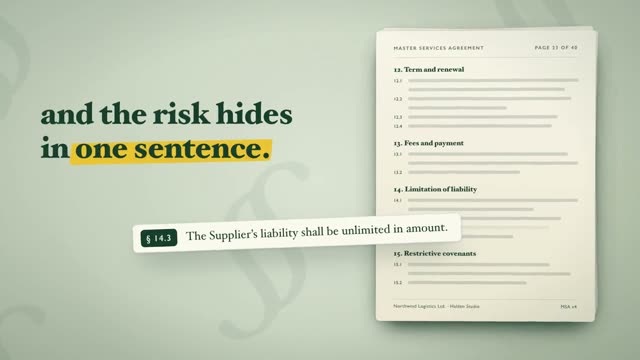
The video above is "Docketa", a 10.8-second product film for a made-up AI contract-review tool. Almost everything in it is text: a stack of 40 contract pages with headings, a single clause with its section number, a counter for clauses checked, and finally a clause whose old wording is struck through and replaced with a better version. It ends on the logo and a tagline.
These are exactly the scenes a video model would be most likely to break. Tiny contract lines, a section number, a struck-through word: one wrong letter and the statement is no longer true. Because Docketa was built as code from a prompt with Claude, every line looks the same in every frame. You can read the opening of the prompt on the video's page, and find more examples like it in the library of AI video prompts.
The hybrid: filmed look plus a sharp text layer
You don't have to pick a side. Many good videos combine both. A video model delivers a shot with atmosphere, say an office in morning light or a hand holding a phone. On top sits a layer of code with the headline, the numbers and the app screen. That way you get real-looking footage and text that is actually correct.
Plan for it in the prompt for the video model: ask for a calm area, no text of its own, no signs and no screens with content. The less the model tries to write by itself, the less you have to cover up later. For more on the two ways to build videos with AI, see AI motion graphics.
What this means for your next video
Before you start, ask one simple question: does anyone need to read something in this video? If yes, and especially for product names, prices, metrics and app screens, don't let the text be painted. Let it be set. For pure mood shots without type, a video model is a good choice.
If you want to try the code route, start with motion design videos with Claude. Anthropic now also offers a dedicated feature for this as a beta on Team and Enterprise plans, covered in our article on Claude Motion. And in the DrillUp Academy we show you how to adapt a long prompt to your own product, so your name ends up on screen spelled correctly.
Frequently asked questions
Why is text in AI video often unreadable?
Video models generate the whole image from pixels. To them, letters are shapes, not characters from a font. That's why words often look almost right but contain wrong or swapped letters, and small text breaks down into lines. Because every frame is computed again, a word can also change during the clip.
Can I fix garbled text in a finished AI video?
Only with effort. You can cover the area and lay real text over it in an editor. If the text moves with the camera, the new layer has to follow it, which means tracking. It's often faster to regenerate the clip without text and add the type afterwards.
Which AI makes videos with clean text?
Newer video models get short words right more often than older ones, but none of them is reliable. Text is only certain to be readable when it is set from a real font. That's what happens when an AI like Claude writes the animation as code: every word appears exactly the way you specified it.
Do I need coding skills to animate text as code?
No. Claude writes the code, you describe what should appear on screen. You need a computer and a paid Claude plan. We walk through the workflow step by step in the DrillUp Academy.