
Claude Motion is included in Team and Enterprise only, not in Free, Pro, Max or Ultra (as of November 17, 2026). Without a Team plan you have two routes: Claude builds the animation as an artifact in the chat, or Claude Code builds the whole film on your computer and renders it to MP4. What you miss is the Motion template, the editor and the export button. If you want Motion itself, you need a Team plan with at least two seats.
You can't use Claude Motion without a Team plan: the feature is only part of the Team and Enterprise plans. Free, Pro, Max and Ultra don't include it, and there is no add-on. You can still make the same kind of animation, though, on two routes Pro already has: Claude builds the animation as an artifact in the chat, or Claude Code builds the whole film on your computer and renders it to MP4. What you lose is the convenience of Motion, not the animation. Everything below comes from Claude's pricing page and the Claude Help Center, as of November 17, 2026.
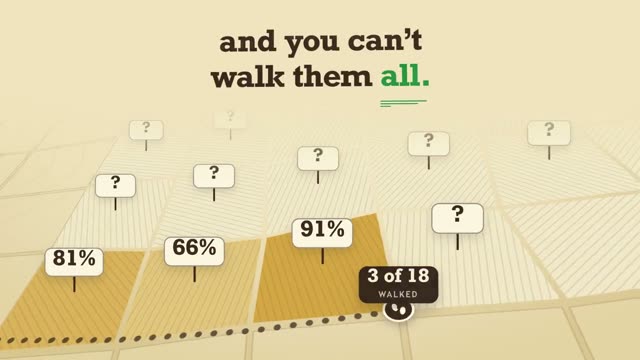
The video above is “Yieldo”, an 11-second 16:9 film for a made-up harvest planning app. Fields show ripeness percentages, one field gets picked, and a harvest plan builds around it. That is exactly the kind of animation Motion was made for: numbers, charts and interfaces in motion. It was made without Motion, from a prompt with 13,613 words. If you want a film like this for your own product, copy the prompt on the Yieldo page and swap in your name, colors and numbers. It works on every Claude plan that includes Claude Code.
Why Pro and Max users don't see Claude Motion
Anthropic launched Motion as a beta on October 8, 2026. The Help Center guide to Motion says it is available on Team and Enterprise only. On Team it is on from the start. On Enterprise it stays off until an owner turns it on under Organization settings, Artifacts. So if there is no “Motion” option under “Output” in your message box, that is not a setting you missed. It is your plan.
Here is what each plan includes. Look at rows two and three: the building blocks Motion uses for its animations are already in Pro.
As of November 17, 2026, from Claude's pricing page (feature comparison by plan). Enterprise includes the same features as Team.
Motion is not a video model either. According to the Help Center, a Motion animation is an artifact made from the Motion template: Claude writes code that animates text, charts, shapes and images, and the result plays like a short video. It does not create real footage or people. That part, code that moves things, is open to you without a Team plan.
What you actually miss without a Team plan
Without Motion you give up three things. None of them makes the animation itself better, but each one saves you a step:
- The Motion template: On Team you start from a ready template in the Artifacts tab. Without it, your prompt has to set the format, length and scenes itself.
- The editor: In Motion you change a word, a number or a timing right in the animation. Without Motion you tell Claude in the chat what to change. That works just as well, but you need one clear sentence about what should stay.
- The export button: Motion downloads the animation as an MP4 via “Export”. Without Motion you need one extra step to turn the code into a video file.
The export is the real difference. That is what the two routes below solve.
Route 1: the animation as an artifact in the chat
According to the pricing page, artifacts are part of every plan, including Free. You ask Claude for an animation as an HTML artifact, and it plays as a preview next to the chat. For short animations with a few scenes, this is the fastest route:
As of November 17, 2026. These steps are our recommendation for plans without Motion.
A prompt for this route has to say more than one for Motion, because no template sets the format and length for you. The example below is short, but it covers everything the template would normally handle:
Build a 10-second 16:9 animation as an HTML artifact that loops. Scene 1 (0 to 3 s): the number 42% counts up from 0. Scene 2 (3 to 7 s): three bars grow from the bottom, one after another. Scene 3 (7 to 10 s): one line of text and the logo. Dark background, one orange accent. All timings fixed in the code, nothing random.
The last sentence matters more than it looks. When every timing is fixed in the code, the animation looks the same each time it plays, and that is what you need to save it cleanly as a video. A screen recording of the preview is the simplest extra step, but it can stutter if your computer can't keep up while playing. The cleaner way is to render the animation frame by frame. How to export a Claude animation to MP4 explains how.
Route 2: Claude Code for the full film
According to the pricing page, Claude Code is part of Pro, Max and Ultra, but not the free plan. It doesn't work in the chat window but in a folder on your computer. For a video, Claude Code writes the whole film as a code project, and a render step turns it into an MP4 frame by frame. This is also how the films in our library are made, Yieldo included.
Compared with Motion, Claude Code has two advantages. First, it handles very long prompts: a 13,000-word blueprint like the one behind Yieldo sets every move, color and transition, and the project stays on your machine even if you render the film ten times. Second, you choose the resolution and frame rate yourself. The Help Center says nothing about the resolution or maximum length of a Motion animation.
The downside: you work with folders and a render command instead of a button. Claude Motion vs Claude Design vs Claude Code compares all three in detail. In the DrillUp Academy we walk through the Claude Code route step by step, from setup to the finished MP4.
Route 3: a Team plan for two
If you want Motion itself, there is no way around the Team plan. The pricing page describes it as a plan for teams of 2 to 150 people, so you pay for at least two seats. In Germany, for example, a Standard seat costs €18 a month billed yearly or €21.04 billed monthly, which puts the smallest Team plan at €36 a month on yearly billing. Pro costs €15 a month billed yearly or €18 monthly. All prices are from the pricing page as of November 17, 2026, and they differ by country, so check the page for yours.
That pays off if you really work as two people, or if you need Team features such as central billing anyway. Alone and only for Motion, you pay more than twice the price of Pro for an export button and an editor. Also keep in mind that Motion counts toward your plan's usage limits, and long or complex animations use more of them than a typical message, according to the Help Center.
Which route fits your video?
For a short animation, like a number counting up or a chart for a slide, route 1 is enough. For a product film with many scenes, fixed timings and a clean MP4 for Instagram or your website, use route 2. Route 3 makes sense if you are two or more people building lots of short explainers from reports and numbers, because that is what Anthropic built Motion for.
On every route, the same thing decides the quality: the prompt. You will find ready-made Motion examples in Claude Motion prompts, and the basics of the feature in Claude Motion: what it does and who gets it. You don't have to write the long blueprint yourself, though. The DrillUp library has ready video prompts for motion design, 3D, talking head and launch films, each with the video it produced. Pick a video, copy the prompt and make it your own on Pro, Max or Ultra, no Team plan needed.
Frequently asked questions
Can I unlock Claude Motion on the Pro plan?
No. According to Claude's pricing page, Motion is not part of Free, Pro, Max or Ultra, and there is no add-on for it. It is only available on Team and Enterprise. On Team it is on by default, on Enterprise an owner turns it on under Organization settings, Artifacts (as of November 17, 2026).
Can I use a Team plan on my own?
The pricing page describes the Team plan as being for 2 to 150 seats, so you pay for at least two seats even if you are the only one using it. Seat prices depend on your country and billing period, so check the pricing page before you switch.
When will Claude Motion come to Pro?
Anthropic has not said. Motion has been a beta for Team and Enterprise since October 8, 2026, and the Claude Help Center says nothing about other plans. Any date you read elsewhere is a guess.
Is an animation made on Pro worse than one made with Motion?
Not by default. According to the Help Center, Motion also builds animations as code, without a video generation model. The difference is convenience: template, editor and export button. In both cases the result depends mostly on the prompt.