
Claude Motion is a new Anthropic feature that turns your prompt into a short animation. Claude writes code that animates text, charts, shapes and images, and you export the result as an MP4. As of October 17, 2026, Motion is in beta on Team and Enterprise plans. It works best with a precise prompt that sets the audience, format, length and scenes.
On October 8, 2026, Anthropic released two features in beta: Claude Dashboards and Claude Motion. If you make videos for a product, a company or clients, Motion is the one to watch. You describe an animation, Claude builds it, and you download an MP4. This guide covers how Claude Motion works, who can use it right now, what it is good for and how to write prompts that don't produce random results.
What is Claude Motion?
Claude Motion turns your content into short animations. Anthropic's own examples: an explainer for an all-hands meeting, an animated chart for a board deck, or a product walkthrough for customer onboarding. Under the hood, every animation is an artifact created from the Motion template.
The key detail: Motion is not a video generation model. Claude doesn't paint frames pixel by pixel the way Sora, Veo or Kling do. Instead, Claude writes code that moves text, charts, shapes and images, and the result plays like a short video. That has two consequences that matter a lot for motion design:
- Type and numbers stay razor sharp. No smudged letters, no invented logos.
- You can change one detail. Edit a word, a number or a timing and everything else stays exactly as it was.
What Motion won't do is create realistic footage or real people. That isn't a weakness, it's a clear focus: Motion is built for motion design, not for film scenes.
How an animation is made in Claude Motion
There are two ways in. Either ask Claude for an animation in a regular chat, for example: "Turn this quarterly report into a 30-second explainer for our all-hands." Or open the Artifacts tab, choose a Motion template and describe what you need. Every animation is saved in Artifacts automatically and starts out private to you.
Who gets Claude Motion?
This is the biggest limitation right now. According to Anthropic's official help page, Motion is in beta on Team and Enterprise plans:
As of October 17, 2026, per the Claude help page on Motion.
On Enterprise, owners can also limit Motion to specific groups. One thing to budget for: Motion counts toward your plan's usage limits. Longer or more complex animations use noticeably more than a typical message, so if you iterate on lots of versions, plan for it.
What Claude Motion is good for
Because Motion animates your content instead of inventing images, it shines wherever text, numbers and interfaces are the stars:
- Product and launch videos: show your app's features step by step, with real copy instead of placeholders. More in How to make a SaaS launch video with AI.
- Animated charts and metrics: revenue, growth or results that build up instead of sitting still on a slide.
- Explainer videos: a process in three to five calm, clear steps. See How to make an AI explainer video.
- Short social clips: kinetic typography and numbers that stop the scroll.
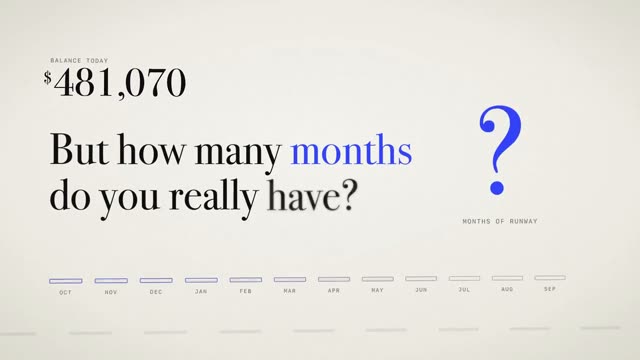
The video at the top is exactly this kind of film: "Burnlo", an 11-second product film for a cash runway tool where big numbers carry the story. It was made entirely from a prompt with Claude.
Motion vs. video models
| Video modelSora, Veo, Kling | Claude Motion | |
|---|---|---|
| How the picture is made | generated pixel by pixel | built as code |
| Type, logos, numbers | often warped or invented | sharp and exact |
| Changing one detail | usually regenerate everything | targeted, the rest stays |
| Real people and scenes | yes | no |
| Best for | cinematic scenes | product videos, explainers, charts |
For motion design, the second approach is almost always the better choice. It's also how every video in the DrillUp library was made: animation built from code, not a generated film.
How to prompt Claude Motion
Anthropic's own advice is simple: say who will watch it, where it will play and roughly how long it should be. And attach the report, data or images you want Claude to use, so the animation is built from your real content. From our work with long video prompts, five more rules make the difference:
- Format first. 16:9 for decks and websites, 9:16 for Reels and TikTok, 1:1 for feeds. The format drives every layout decision.
- Plan scenes in seconds. Say what happens when. One idea per scene is enough, viewers take in exactly one message in about two seconds.
- A common thread. One element that travels through every scene, like a number that keeps growing or a line that leads into the next shot.
- Describe motion, not just content. How does an element enter? Easing out softly, with a slight overshoot, from below? Leave it out and Claude picks something generic.
- Lock colours and type. Give hex values and a typeface instead of writing "modern".
Here is how such a prompt might start. The colours show what each part pins down:
Create a 12-second animation in 16:9 for our website. Audience: founders planning their finances. Background #F4F1EA, numbers in black, one accent colour #E8581A. Scene 1 (0 to 3 s): the figure "14 months" counts up from 0 and eases out softly. Scene 2 (3 to 7 s): …
- Length and format
- Placement and audience
- Colours
- Scene with timing and motion
That opening already fixes the format, audience, colours and timing of the first scene. A complete prompt keeps going like this until the very last frame. Prompts in the DrillUp library average about 15,500 words: a full script covering camera, light and every single movement. To learn how to build a blueprint like that yourself, read How to write AI video prompts.
What if you're not on a Team plan?
You don't have to wait. Claude can build animations as code on other plans too, just without the Motion template, the editor and the export button. You get the animation as a preview in the chat and save it as an MP4 with one extra step. The guide Export a Claude animation to MP4 explains how, and the DrillUp Academy walks you through it step by step.
With Motion or without, the result depends almost entirely on the prompt. "Make a cool video for my app" gets you something random. A precise blueprint gets you a video that looks planned.
Verdict: is Claude Motion worth it?
For teams that regularly present updates, launches or metrics, Motion is a big step. Animations happen where the content already lives, and small changes take seconds instead of another round in editing software. For now it's a beta limited to Team and Enterprise. The approach behind it, animation as code from a precise prompt, already works with Claude today. To see what's possible, browse the AI video prompts with finished example videos or read how to make motion design videos with Claude.
Frequently asked questions
Is Claude Motion free?
Motion is included in the Team and Enterprise plans at no extra cost. It does count toward your plan's usage limits, and longer animations use more of them than a normal message. According to Anthropic, Motion is not available on the Free plan.
Can Claude Motion create realistic video or people?
No. Motion does not use a video generation model. It animates the text, charts, shapes and images you provide. That makes it ideal for product videos, explainers and animated numbers, but not for filmed scenes.
How do I export an animation from Claude Motion?
Open the animation, click "Export" and choose MP4. To share it, use "Share". Every animation is saved in the Artifacts tab.
Can I do this without a Team plan?
Claude can build animations as code on other plans too. You won't get the Motion editor or the export button, but the animation can still be saved as an MP4 with one extra step. Our MP4 export guide shows how.