
For a finished video, Claude Motion is the direct route: it builds short animations in chat and exports them as MP4, but only on Team and Enterprise plans. Claude Design makes designs, slides and clickable prototypes, and its help article lists no video export. Claude Code is the route for Pro, Max and Ultra and for long films with many scenes, with one extra step to get the MP4.
Claude Motion vs Claude Design: which one actually makes your video? Short answer: Claude Motion builds short animations right in chat and exports them as MP4, but only on Team and Enterprise plans. Claude Design makes designs, slides and clickable prototypes, and its help article lists no video export at all. If you are on Pro, Max or Ultra, or you want a long film with many scenes, the route is the third one: Claude Code. Below you will find what each route does, which plan includes it and which video it suits. Everything here comes from Anthropic's official pages, as of November 13, 2026.
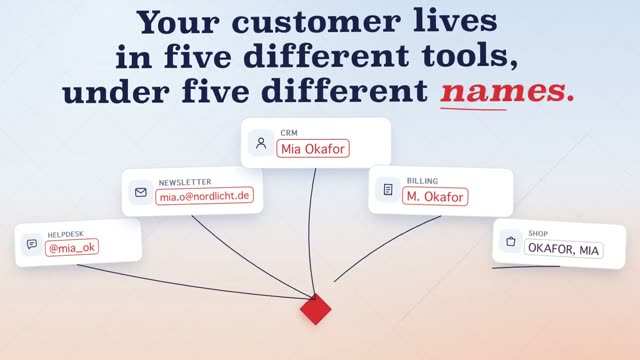
The video above is "Kitebase", a 12-second 16:9 film for a made-up customer-data platform. One customer shows up in five tools under five different names. Kitebase pulls everything into one clean table, merges the duplicates and sends the right segment back. There is no camera and no real people in it, only type, interface, lines and motion. That is exactly the kind of video every Claude route can build, because Claude writes the film as code. The prompt behind it is on the Kitebase page: copy it, swap in your company, and you get the same story with your own product.
Three routes at a glance
All three belong to Claude, but each is built for a different result. Here is what you end up holding with each one.
As of November 13, 2026, per the Claude help center on Claude Motion, Claude Design and Claude Code on Pro, Max and Ultra and Team and Enterprise.
Claude Motion: a finished video in chat
Claude Motion has been in beta since October 8, 2026. You describe what you want to show in chat, for example a 30-second explainer, an animated chart or a walkthrough of your product, and Claude builds an animation that plays like a short video. You can start in any chat: ask for an animation, pick "Motion" under "Output", or open a Motion template in the Artifacts tab.
The key thing to expect: according to Anthropic, Motion does not use a video generation model. It does not create real footage or people. It animates text, charts, shapes and the images you bring. In return, type stays sharp, and you can change a word, a number or a timing without touching the rest. To get the file, click "Export" and choose "MP4".
The catch is the plan. Motion is only on Team and Enterprise. It is on by default on Team, and on Enterprise an owner has to switch it on under Organization settings, Artifacts. Long or complex animations also use more of your limit than a normal message. The help center gives no resolution or maximum length. For everything else about Motion, including templates, read Claude Motion: what it does and who gets it. Ready-made examples to copy are in Claude Motion prompts.
Claude Design: designs and slides, not video
Claude Design is a different tool, even if the name sounds close. You talk to Claude, and a design appears on a canvas next to the chat: a page, a slide, a one-pager or a clickable prototype. According to the help center, Claude Design is on every plan, including Free.
You can export it as .zip, PDF, PPTX, Google Slides or a standalone HTML file, and hand it off to lots of other apps and to Claude Code. The Claude Design help article does not mention video or MP4 anywhere. A clickable prototype reacts to your clicks, but you will not get a video file for Instagram or your website from a button here.
There is news on this right now. Claude Design has worked inside Claude since September 16, and the old standalone site claude.ai/design closes on December 14, 2026. After that it is read-only and you cannot start new projects there. Design systems move over in one step for the whole organization, and moving projects is rolling out gradually to paid plans. According to the help article on the move, chats and comments do not come along, and public links to old projects stop working. If you keep video drafts there, move them before the date.
For video, Claude Design is still useful, just at a different point. Use it to lock the look: colors, type, how a scene is laid out. Then hand that design to Claude Code, which turns it into a moving film.
Claude Code: the route for long films
Claude Code does not work in the chat window. It works in a folder on your computer. The help center lists it on Pro, Max, Ultra, Team and Enterprise, but not on Free. For a video, Claude Code writes the whole film as code: every scene, every move, every timing. A render step then turns that into an MP4, frame by frame. The article Export a Claude animation to MP4 walks through that step.
That is one step more than an export button. In return you get two things. First, the whole project is yours: you can change single scenes and render the film again as often as you like. Second, this route handles very long prompts. The Kitebase prompt is about 15,000 words for just 12 seconds of film, because it pins down every move and every frame. That level of detail works best as a project with files that Claude works through scene by scene.
If you are on Pro, Max or Ultra, you do not get Claude Motion, so Claude Code is your direct route to an MP4. For the bigger picture of what Claude can and cannot do with video, read Can Claude make videos?.
Which route fits your video?
Two questions decide it fastest: which plan are you on, and what should come out at the end? The chart matches the most common cases.
As of November 13, 2026. Plans per the Claude help center. The Free plan includes neither Claude Motion nor Claude Code.
None of the three routes makes real footage of people, nature or light. For that you need a video model. The difference matters: a video model paints every frame itself, and type or logos can blur. With all three Claude routes the video is built, not painted.
What this means for a prompt from the library
Every film in our library was made with Claude as code, with no camera and no video model. The prompts behind them are plain text. You can paste them into Claude Motion, into Claude Code or into any AI you like. Where they run best mostly depends on length.
A short prompt for a single animation fits Claude Motion well. A long prompt like the one for Kitebase, with many scenes and exact timings, runs more reliably in Claude Code, where each scene can be edited as its own file and you render the result yourself. This is how such a prompt starts:
# Kitebase – 12-second product film for a customer-data platform (customer data from every tool in one table), 16:9 ## 0. What you are building A short, calm motion-design film for an invented SaaS product called Kitebase, which pulls one customer's records out of five different tools into one table, merges the duplicates and sends the
another 14,852 wordsThis is only the start. Our prompts average around 8,500 words: every scene, every movement, every colour is described precisely. That is why your video comes very close to the example.
Get access nowPick a video
You see exactly what you will get.
Copy the prompt
One click. Structure, style and motion are already in there.
Create your own video
Change topic, style and scenes. No experience needed.
You can see the rest of the prompt after unlocking it on the Kitebase page. In the DrillUp library you will find ready-made video prompts for motion design, 3D, talking head and launch films, each with the video it produced. Pick a video, copy the prompt and make your own version, with Claude or any AI you like. In the DrillUp Academy we show you step by step how to get from the preview to a finished MP4.
Frequently asked questions
Can Claude Design export a video?
Not according to the Claude help center. Claude Design exports to .zip, PDF, PPTX, Google Slides or standalone HTML and can hand off to Claude Code. MP4 export is only listed for Claude Motion (as of November 13, 2026).
Is Claude Motion included in Pro or Max?
No. Claude Motion is a beta for Team and Enterprise plans. It is on by default on Team, and on Enterprise an owner has to turn it on under Organization settings, Artifacts. On Pro, Max or Ultra, use Claude Code for video.
What happens to Claude Design on December 14?
The standalone site claude.ai/design closes on December 14, 2026 and becomes read-only. Claude Design itself stays and already runs inside Claude. You can move design systems and projects over before then. Chats and comments do not move with them.
Which route works best for a DrillUp prompt?
Short animations work in Claude Motion if you are on Team or Enterprise. For long prompts with many scenes and exact timing, Claude Code is the safer route because the whole film lives as code on your computer. The prompts are plain text and run on either route and in any AI you like.