
Yes, Claude can make videos, just not the way a video model does. Claude writes the animation as code that moves text, numbers, shapes, images and even 3D scenes, and that code becomes an MP4 file. Claude does not create realistic footage or real people. The easiest route is Claude Motion (a beta for Team and Enterprise); on other plans you add one extra step when you export.
Can Claude make videos? Short answer: yes, but not in the way most people expect. Claude isn't a video model like Veo or Kling that paints every frame pixel by pixel. Claude writes the animation as code, and that code turns into a regular MP4 file. That's why many of the top search results still say "Claude can't make videos." Since Anthropic introduced Claude Motion in October 2026, that's no longer true. This guide shows what works today, what doesn't, and which route makes sense for you.
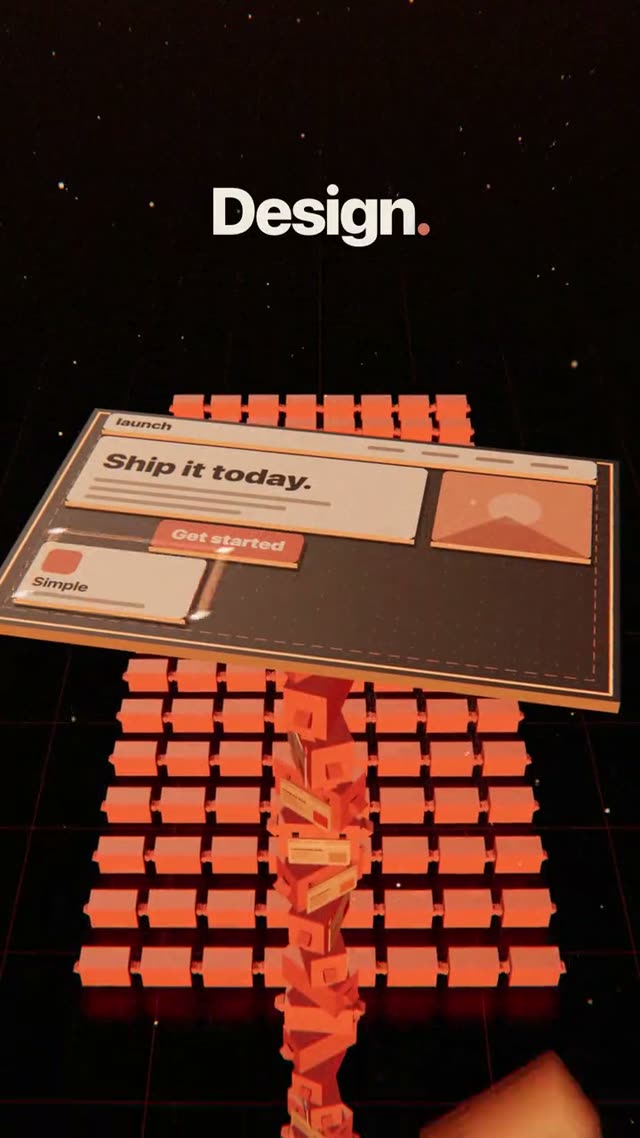
The video above is a good example. "Claude Agents" is a 25-second 3D film in 9:16. It's one continuous camera move through worlds nested inside each other, and it was made entirely from a single prompt with Claude. No footage, no video model, just code that calculates every frame.
What Claude can and can't do with video
Before you put time into it, an honest overview helps. The cards show what works with Claude alone, what works with limits, and where you need a different tool:
As of October 27, 2026, based on Claude's Motion help page and upload help page.
The first card matters most. When people hear "video," they often picture a filmed beach scene. Product videos, app ads, explainers and social clips rarely need that. What carries them is type, interfaces, numbers and logos, and that's exactly where Claude is strong.
Why Claude builds videos as code
A video model learns from millions of clips what footage looks like, then generates new frames that look similar. The result feels cinematic, but there's a catch: the model has no idea what a letter is. That's why text, logos and app screens so often turn to mush in generated video. Our guide on garbled text in AI video explains why.
Claude takes the other route. Anthropic's Motion help page states plainly that it doesn't use a video generation model. Claude writes code that defines which element sits where, at what moment, and how it moves. Three things follow from that:
- Type stays crisp. A word is a word, not a picture of one. No made-up letters.
- Every detail is under your control. Change a number, a word or a timing and everything else stays exactly as it was. With a video model you usually regenerate the whole clip.
- Results are repeatable. The same code produces the same video every time, which matters when you only want to tweak one small thing later.
The trade-off: Claude doesn't invent photos or filmed scenes. Everything on screen is built, drawn, or comes from images you provide.
How to get a video out of Claude today
Whatever plan you're on, the workflow has the same four steps. Only the last one changes depending on your route.
With Claude Motion, the last step is a click on "Export." According to Anthropic, Motion is a beta for Team and Enterprise. It's on by default for Team, while on Enterprise an owner has to turn it on. Everything else you need to know is in our Claude Motion guide.
Without Motion, Claude builds the animation the same way, just without the editor and the export button. To get the MP4, the animation is captured frame by frame so every single frame lands exactly right. Screen recording is a bad idea here because it stutters and drops frames. The extra step is explained in how to export a Claude animation to MP4, and the DrillUp Academy walks you through it step by step.
What doesn't work, and what to do instead
Real people and filmed scenes. If your video needs a person talking to camera or a scene in a real location, you need footage or a video model. Claude can still write the outline and the script. A good middle ground is to film yourself briefly and let Claude build the graphics, type and animation around it.
Analyzing an existing video. If you want Claude to understand a video, say a reference reel from Instagram, give it still frames from the key moments and a transcript if someone speaks. According to the help page, Claude accepts images in JPEG, PNG, GIF and WebP. From those, Claude can work out how the scenes are put together.
Very long films. Anthropic doesn't name a fixed maximum length for Motion. Longer and more complex animations do eat more of your plan's usage limits. For ads and product videos that rarely matters, since 10 to 30 seconds is typical.
Where Claude videos usually fail: the prompt
Claude can do a lot, but it can't guess what's in your head. A line like "make a cool video for my app" gets you a random result, usually a slide with a few effects. A good video prompt reads more like a short screenplay. It might start like this:
Create a 15-second animation in 9:16 for Instagram. Near-black background, one orange accent color. Scene 1 (0 to 3 s): the app name types in letter by letter and eases to a stop. Scene 2 (3 to 7 s): the camera pushes into a phone screen with no cut …
It keeps going like that, scene by scene, with timings, colors, type and every movement. The prompt behind the Claude Agents film above runs to about 5,000 words. It defines how the camera travels from one world into the next, where every object sits and when each line of text appears. That level of detail is the difference between "looks like AI" and "looks planned." Our guide on how to write AI video prompts shows how to build one.
You don't have to write that prompt yourself, though. The DrillUp library has ready-made video prompts for motion design, 3D and talking head, each with the video it produced. Pick a video, copy the prompt and use Claude to turn it into your own: a different product, different copy, different scenes.
Bottom line: which videos is Claude good for?
Today Claude is a strong tool for anything made of type, interfaces, numbers, shapes and built 3D scenes: launch films, app ads, explainers, animated charts and short social clips. For filmed scenes with real people you still need a camera or a video model. If you want to see what a precise prompt can do, browse the AI video prompts with finished example videos or read how to create motion design videos with Claude.
Frequently asked questions
Does Claude have its own video model?
No. Anthropic says Claude Motion doesn't use a video generation model either. Claude builds every video as code that moves elements around. That keeps text, numbers and logos sharp, but filmed scenes with real people aren't possible.
Can I send Claude a video so it understands what's in it?
Not directly. The official list of upload formats covers documents and images (JPEG, PNG, GIF, WebP) but no video files. Upload still frames from the video or a transcript instead, and Claude works well with those.
Do I need a Team plan to make videos with Claude?
Only for Claude Motion and its export button. Claude builds animations as code on other plans too. To get the MP4 file, you add one step where the animation is captured frame by frame.
How long can a video from Claude be?
Anthropic doesn't set a fixed maximum length for Motion. Longer and more complex animations do use more of your plan's usage limits. For product videos and ads, 10 to 30 seconds is the usual length anyway.