
Yes, long prompts fit in Claude. In chat, paid plans have a context window of 200,000 to 1 million tokens, depending on the model. Even our longest video prompt, at 24,998 words, fills roughly a quarter to a twentieth of that. The usage limit is the tighter one: paste the prompt once, then only send changes (as of November 29, 2026).
Long prompts in Claude work fine, even at 20,000 words or more. The real question is not whether the text fits, but how much of your usage limit it eats. Our video prompts are exactly that long because they pin down every second of a film. This guide shows how much room such a prompt really takes, why your limit can still drain fast, and how to use the prompt so a Pro plan takes you a long way. All facts come from the Claude help article on usage and length limits, checked on November 29, 2026.
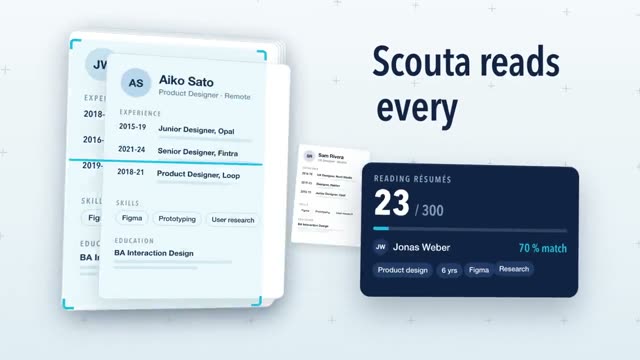
The video above is “Scouta”, a product film for a made-up tool that reads job applications and books interviews. It runs 9.6 seconds in 16:9 and tells, in seven scenes, how 300 résumés turn into one booked interview. The prompt behind it has 22,886 words in eleven parts. On the Scouta page you can copy it and swap the name, colours and numbers for your own. How to paste a text that long without wasting your limit is explained below.
Long prompts in Claude: the two limits that matter
The help center describes two kinds of limits, and people mix them up all the time:
- The length limit is the context window. It is how much text Claude can see in one conversation at once: your prompt, every message, attached files and the replies. Part of it is always reserved for Claude's answer.
- The usage limit is how much you can work with Claude over a period of time. There is a session limit that resets five hours after your first message, plus a weekly limit. Claude on the web, Claude Code and the desktop app all count toward the same limit.
A long prompt almost never fails because of the context window. It does cost usage with every message, though, because Claude takes the whole conversation so far into account. That is why some people hit the limit warning after a few rounds even though the prompt fitted easily.
How much room does a 25,000-word prompt take?
In chat on paid plans, the newest models (including Fable 5.2, Opus 5.5, Sonnet 5.5 and Haiku 5.5) have a 1-million-token context window. Some older models such as Opus 4.8 and Sonnet 4.6 have 500,000, the rest 200,000. That is what the help page on context windows lists. It does not say how many tokens a word is, only that 200,000 tokens are about 500 pages of text or more.
So we deliberately count generously, at 2 tokens per word. That is an assumption, not a measurement, and probably on the high side, since our prompts are mostly plain sentences. The longest prompt in our library has 24,998 words, so at most about 50,000 tokens. Here is how much of each window that fills:
25 %taken by the longest prompt, the rest stays free
5 %taken by the same prompt
Room is not the problem Even in the smallest window, three quarters stay free. What runs short is the usage limit, because every further message counts the whole conversation.
One square equals 1 % of the context window. Prompt length from our library as of November 29, 2026, tokens estimated at 2 per word. Window sizes from the Claude help center.
Most prompts are much shorter. We counted all 282 prompts that are online right now. The median per style is 14,660 words for talking head, 12,414 for motion design, 3,620 for launch films and 2,114 for 3D. A typical motion design prompt therefore takes about an eighth of a 200,000-token window and just over two percent of a 1-million-token one. That leaves plenty of room for follow-ups, edits and Claude's replies.
Why a long prompt still drains your limit
What a message costs depends, according to the usage limit best practices, on several things: message length, attachment size, conversation length, tools such as web search or Research, the model, the effort level and artifacts. A video prompt stacks several of these at once. The text is long, Claude Code writes files, and the highest effort level is often switched on.
Then there is the conversation itself. The longer it gets, the more each new message counts. When a chat nears the context window, Claude summarizes older messages automatically, and the help center notes that such conversations use more of your limit. The most expensive routine is: paste the prompt, fix ten small things one by one, then paste the same prompt into a new chat because something went wrong.
Paste it once, then send only changes
The graphic puts both routines side by side. The prompt is the same length in both. The difference is what happens afterwards:
The full prompt every time
You paste the whole prompt, send many separate corrections and, when something breaks, start a new chat with the same text. Every restart counts the full prompt again, and every small message lands on top of an ever longer conversation.
Paste once, batch the edits
You adapt the prompt first, paste it once and collect your wishes in one message. Claude rebuilds only the parts that are affected. If the chat gets too long, you start a fresh one from the finished state, not from the beginning.
The biggest saving happens before you paste. Our prompts have a part just for this: in Scouta, part 1 is called “Make it yours” and lists everything you swap for your brand, such as the name, the captions, the big number, the colours and the logo. If you change that right in the text, Claude needs no round of questions. If something else comes up later, send one batched message like this:
Keep the build plan above exactly as it is. Change only three things: brand name “Rekruto” instead of “Scouta”, signal colour green instead of cyan, and the big number becomes “480”. Then rebuild only the scenes where these appear, and list the files you changed.
Two habits from the Claude help center fit right in. First, review and edit your prompt before you send it instead of correcting it with follow-ups. Second, refer to what is already in the chat (“as described in part 5”) instead of pasting it again.
Projects: store the prompt instead of repeating it
If you need the same long text again and again, for example because you build several versions of one prompt for different clients, put it in a project. The help center says project content is cached and counts less against your limits when you reuse it. The cache expires after a break. Your first message then counts the content in full again, and after that it counts less once more.
For video prompts that means: add the adapted prompt to the project as a file, keep the project instructions to a short note on what Claude should do with it, and remove files you no longer need. The help center explicitly recommends short project instructions and deleting unused files. Several chats in the same project still draw on your plan's usage, so it is not an extra allowance.
Which model and effort level for long prompts?
The help center lists both the model and the effort level among the things that cost usage. For a long build plan, a strong model is still worth it on the first build, because it follows more rules at once. For small edits afterwards (one word, one colour, one second), a lower effort level or a cheaper model is often enough. When Sonnet 5.5 is enough and when Opus 5.5 is better is covered in Sonnet 5.5 vs Opus 5.5 for Motion Design. The effort levels themselves are explained in Opus 5.5 Motion Design Prompts.
Also switch off tools and connectors you do not need for the film. The help center calls them token-intensive, so they cost a lot of usage. A video prompt usually needs neither web search nor outside connectors. You can see how much you have used under Settings, Usage.
Why our prompts are still this long
A short prompt saves usage, but it leaves Claude guessing. How softly a card slows down, when the camera moves on, which font sits at which size: whatever the prompt leaves out, Claude decides on its own, usually not the way you wanted. Then come many rounds of fixes, and those cost more than a long prompt up front. That is why the Scouta prompt spells out, in eleven parts, what gets built, how to adapt it, design, stage and camera, every element, the timeline, transitions, details, motion rules, a frame-by-frame check and the sound.
More finished films with their length and prompt size are in Claude Animation Examples: 12 Videos and Their Prompts. Every video prompt, next to the film it produced, is in the DrillUp library. How to take a prompt from setup to a finished MP4 with Claude Code is shown in the DrillUp Academy and step by step in Make AI Videos and Animations with Claude.
Frequently asked questions
How long can a prompt be in Claude?
As long as the model's context window allows. According to the Claude help center, paid plans get 1 million tokens in chat with the newest models such as Opus 5.5 and Sonnet 5.5, 500,000 with some older ones and 200,000 otherwise. Part of the window is always kept free for the reply (as of November 29, 2026).
How many tokens is one word?
The Claude help center gives no fixed ratio. It only says that 200,000 tokens are about 500 pages of text or more. Code, numbers and coordinates take more tokens than plain sentences. To stay on the safe side, this guide assumes 2 tokens per word.
Why does my Claude limit run out so fast?
According to the help center, usage depends on message length, conversation length, the model, the effort level and the tools you have switched on, among other things. A long prompt inside a long chat therefore costs a lot. Fresh chats, batched edits and projects for text you reuse all help.
Does a Claude project really save usage?
Yes, if you use the same text more than once. The help center says project content is cached and counts less against your limits when reused. The cache expires after a break, and then your first message counts that content in full again.